The Node Global Object
The Site Office
Section titled “The Site Office”If the Browser is a hotel room where the window lets you see outside, Node.js is a construction site where there are no windows—only a Site Office.
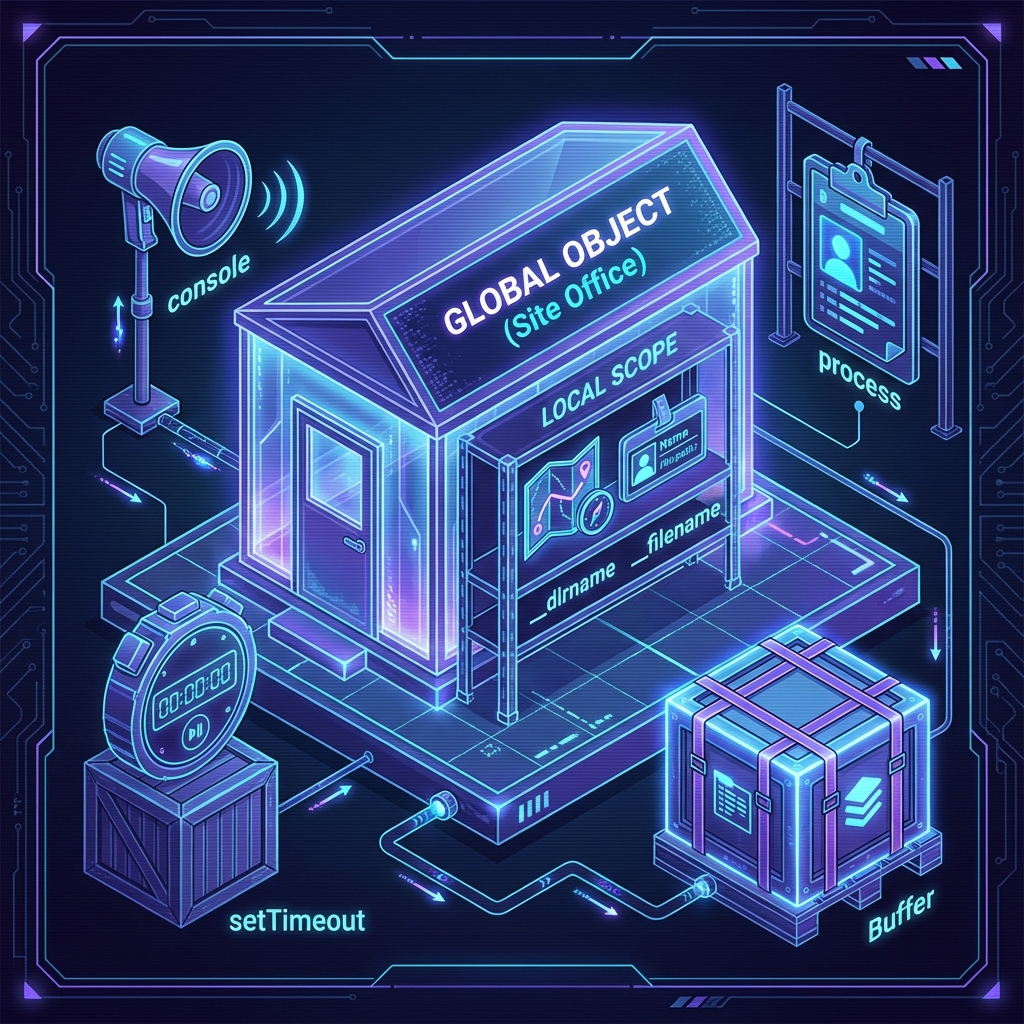
In Node.js, this Site Office is called the global object.
It’s the central command center. No matter where you are on the job site (in any file), you can always walk into the Site Office to grab the essential tools you need. You don’t need to ask permission or import them; they are just there.
What’s in the Office?
Section titled “What’s in the Office?”The global object holds the tools that are so fundamental, Node assumes you’ll need them everywhere.
1. The Usual Suspects
Section titled “1. The Usual Suspects”Some of these will look very familiar from the browser world. They exist in Node too, hanging on the wall of the Site Office:
console: For logging messages (your megaphone).setTimeout/setInterval: For scheduling tasks (your break timer).clearTimeout/clearInterval: For cancelling those tasks (back to work!).
2. The Node Specials
Section titled “2. The Node Specials”Then there are tools specific to the construction site that you won’t find in a hotel room:
process: This is a big one. It gives you information about the current Node.js process running your code. It’s like the ID badge and safety manifest for the current job.Buffer: A way to handle binary data (raw streams of bytes). We’ll handle this heavy machinery later.
3. The “Sort-of” Globals
Section titled “3. The “Sort-of” Globals”There are two special variables that act global—you can use them in any file—but they actually give you information specific to that specific file.
__dirname: The absolute path to the folder the current file is in. (Where am I standing?)__filename: The absolute path to the current file itself. (Who am I?)
Challenge: Inspect the Office
Section titled “Challenge: Inspect the Office”You don’t have to take my word for it. Let’s walk into the office and look around.
- Open your terminal.
- Type
nodeand hit Enter. (You are now in the Node REPL). - Type
global.(including the dot) and hit Tab twice.
You’ll see a massive list of everything available in the global scope.
(To exit, press Ctrl + C twice, or type .exit).
Extra Bits & Bytes
Section titled “Extra Bits & Bytes”Node.js Globals Docs
⏭ Packing Your Bags
Section titled “⏭ Packing Your Bags”Now that we know where the tools are, let’s learn how to bring in outside help. It’s time to talk about NPM.