Connection Security
Create the Database Admin User
Section titled “Create the Database Admin User”MongoDB has automatically added the current IP address to the whitelist and has autogenerated a username and password for the ADMIN user.
Make sure to copy the Username and Password somewhere safe.
We will need it later.
Important: Click the Create Database User button to actually create the user.
If you don’t do this now, don’t panic. You can create the user manually later.
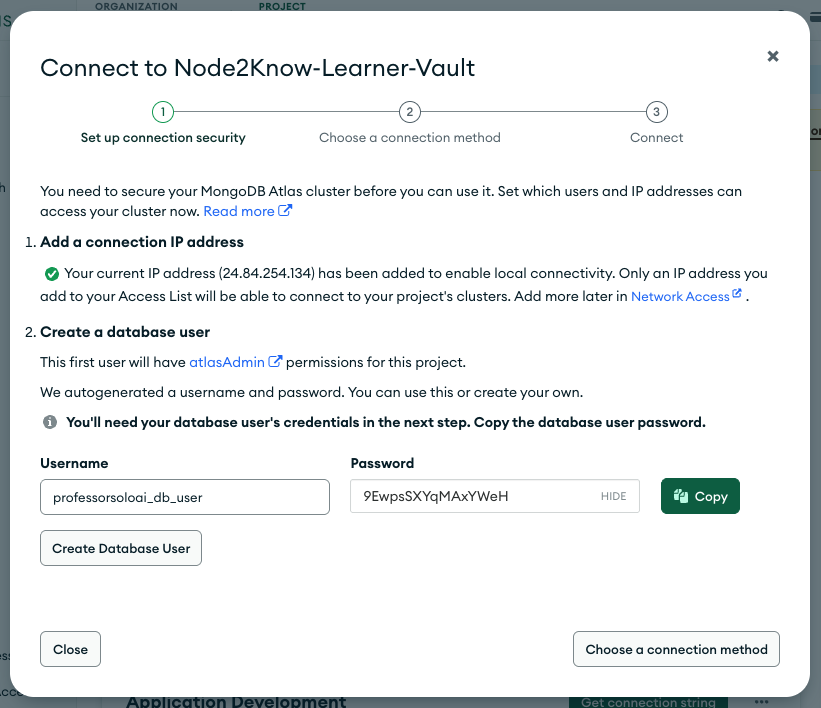
Fig 1: Connection Security Wizard
Once both item 1 and 2 have checkmarks, click the green Choose a Connection Method button.
Note: We will cover the connection method in the next step.
⏭ Equipping the Tools
Section titled “⏭ Equipping the Tools”Installing mongosh so we can actually talk to this thing.