Handling Contacts
Writing to the Database
Section titled “Writing to the Database”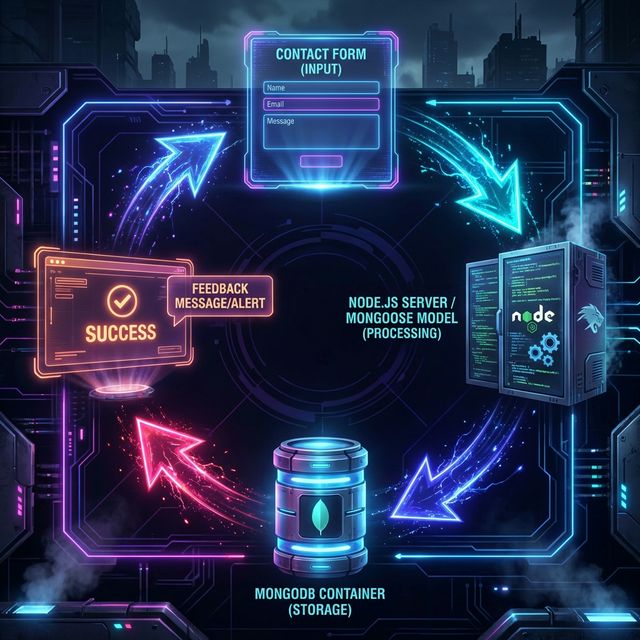
For our contact form, we use a “Write” operation. We create a new instance of our model using the incoming form data and then use .save() to persist it to MongoDB.
Receive Data, Construct Model, Save
Section titled “Receive Data, Construct Model, Save”data/contacts.js
const mongoose = require("mongoose");
const contactSchema = new mongoose.Schema({  name: String,  email: String,  message: String,  postedDate: { type: Date, default: Date.now },});
const Contact = mongoose.model("Contact", contactSchema);
class ContactOps {  async createContact(formData) {    try {      const newContact = new Contact(formData);      await newContact.save(); // Mongoose handles the insertion logic      return { success: true };    } catch (error) {      return { success: false, error };    }  }}
module.exports = new ContactOps();
The Route
Section titled “The Route”routers/contactRouter.js
const express = require("express");const router = express.Router();const _contactOps = require("../data/contacts");
router.get("/", (req, res) => {  res.render("contact");});
router.post("/", async (req, res) => {  // Pass the raw body directly to our data layer  const result = await _contactOps.createContact(req.body);
  if (result.success) {    res.render("contact", { message: "Thanks for reaching out!" });  } else {    res.render("contact", { message: "Whoops, something went wrong." });  }});
module.exports = router;
The View
Section titled “The View”views/contact.ejs
<form action="/contact" method="POST">  <label>Name: <input type="text" name="name" required /></label>  <label>Email: <input type="email" name="email" required /></label>  <label>Message: <textarea name="message" required></textarea></label>  <button type="submit">Send Message</button></form>
<% if (typeof message !== 'undefined') { %><p class="alert"><%= message %></p><% } %>
The Mechanism
Section titled “The Mechanism”new Contact(formData): Creates a transient Mongoose document in memory..save(): Asynchronously writes that document to the MongoDB collection.
⏭ Next: Clean Exits
Section titled “⏭ Next: Clean Exits”We opened and used our connection to the database via mongoose.
Now let’s be polite and make sure we close it properly when we’re done.