Dual-Purpose Forms
Don’t Repeat Yourself
Section titled “Don’t Repeat Yourself”When building a management interface, you’ll quickly notice that creating a new item (like a Project footprint) and updating an existing one require almost identical HTML forms.
They both need the same <input> fields, the same <textarea> elements, and the same labels. The only real differences are:
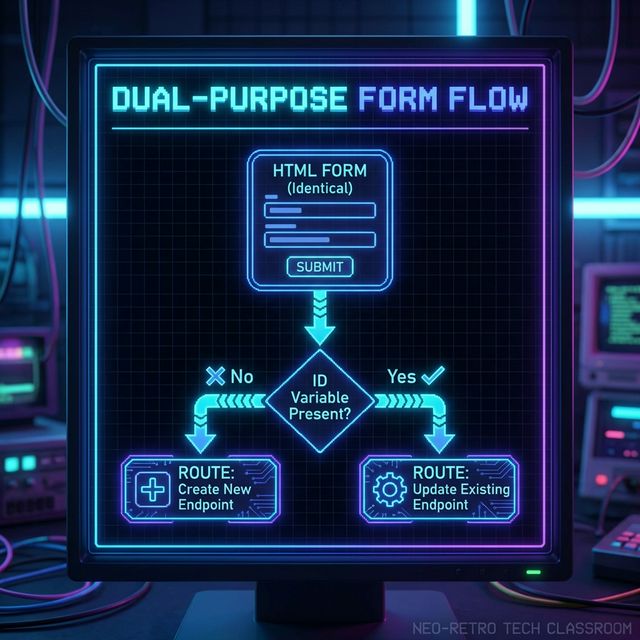
- The Destination: A creation form submits to a “New” route; an edit form submits to an “Update” route aiming at a specific ID.
- The Initial Values: A creation form is blank; an edit form is pre-filled with the existing data.
Rather than maintaining a project-create.ejs and a project-update.ejs side-by-side, we consolidate them into a single Dual-Purpose Form.
The Control Signal: project_id
Section titled “The Control Signal: project_id”The secret to a dual-purpose form is passing down a variable that tells the view which mode it’s in. If we pass down a project_id, the view knows it is in Edit Mode. If project_id is null or undefined, the view acts as a Create Mode form.
We use this single piece of logic to dynamically change the form’s action target and the values inside the inputs.
Copy-pasting form HTML is a nightmare for maintenance. If you add a new “Category” field later, you don’t want to add it to two different files. Consolidate your forms early to protect your sanity.
Extra Bits & Bytes
Section titled “Extra Bits & Bytes”📘 Dual-Purpose Forms Infographic (PNG)
Wikipedia: DRY Principle
⏭ Next: The EJS Conditional Boilerplate
Section titled “⏭ Next: The EJS Conditional Boilerplate”Let’s look at the actual EJS syntax required to build a form that bends to our will.