Embedded Data
Primitive Arrays vs Subdocuments
Section titled “Primitive Arrays vs Subdocuments”When embedding data directly inside a parent document, Mongoose gives us two powerful options depending on the complexity of the data we need to store: Primitive Arrays and Subdocuments.
1. Primitive Arrays
Section titled “1. Primitive Arrays”If you only need to store a simple list of values—like a series of single-word tags (["Node", "Express", "React"])—you can embed an array of simple strings natively on your schema:
const projectSchema = new mongoose.Schema({ title: String, tags: [{ type: String }], // Primitive Array});This is incredibly fast and simple to set up. However, because it only stores raw strings, you lose the ability to give the tag additional properties later (like a description, a color hex code, or an icon).
2. Embedded Subdocuments
Section titled “2. Embedded Subdocuments”When your embedded data is more complex than a simple string, you can define a completely new Schema (a Subdocument) and embed it inside the parent document.
A perfect example is an e-commerce Order. An order needs a shipping address. An address has multiple specific fields (street, city, state, zip). We absolutely want Mongoose to validate that all four fields are provided when an order is placed.
However, looking at the architecture, this address only matters in the context of this specific order receipt. It doesn’t need to live in its own independent Addresses collection because we don’t ever need to query for “all addresses in the database” or build a standalone “Address Directory” page.
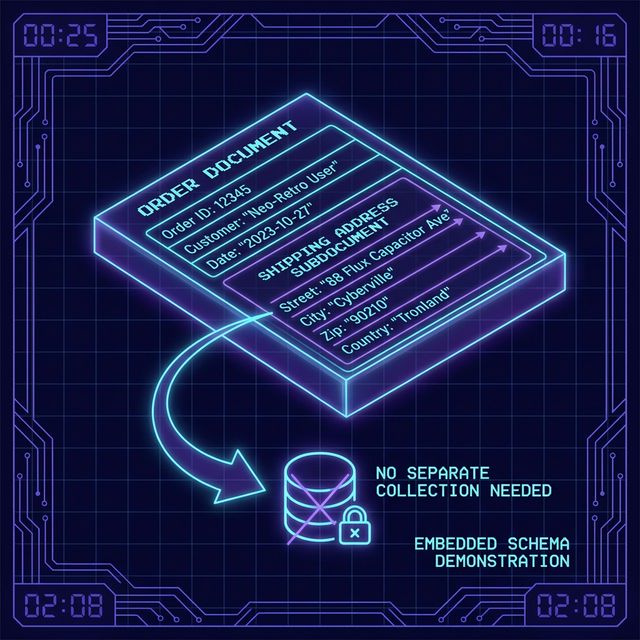
Fig 1: Order Address Subdocument
We get the strict validation of a Schema, with the speed of Embedded Data:
// 1. Define the abstract Subdocument structureconst addressSchema = new mongoose.Schema(  {    street: { type: String, required: true },    city: { type: String, required: true },    state: { type: String, required: true },    zip: { type: String, required: true },  },  { _id: false },);
// 2. Embed it inside the Parent documentconst orderSchema = new mongoose.Schema({ orderNumber: String, customerEmail: String, shippingAddress: addressSchema, // The subdocument is embedded here!});Did you notice { _id: false }? By default, Mongoose generates a unique ObjectId for every single subdocument. Because an address only exists as part of the order receipt and we will never need to look up this specific address by a database ID, we can safely turn this off to save database space!
Extra Bits & Bytes
Section titled “Extra Bits & Bytes”📘 Embedding Subdocuments Infographic (PNG)
⏭ Next: Project Tags Setup
Section titled “⏭ Next: Project Tags Setup”Now that we understand the power of Subdocuments, let’s create a tagSchema subdocument and modify our Portfolio application’s Project model to store them.