Understanding Object References
Refactoring Our Approach
Section titled “Refactoring Our Approach”We’ve seen the power of embedding tagSchema subdocuments directly into our Project model. It’s incredibly fast to read, and filtering by nested queries is simple once the data is saved.
So… why don’t we just embed Categories the exact same way?
If a project needs a category, we could just embed { name: "Web App" } right next to the tags array!
This works for simple applications, but let’s explore three major structural flaws with embedding core organizational data like Categories:
Flaw 1: Massive Data Redundancy
Section titled “Flaw 1: Massive Data Redundancy”If you build 50 web applications, and each embeds { name: "Web App" }, your database now stores the string “Web App” 50 independent times. This wastes disk space, but more importantly, it fractures a single underlying concept into 50 disjointed copies.
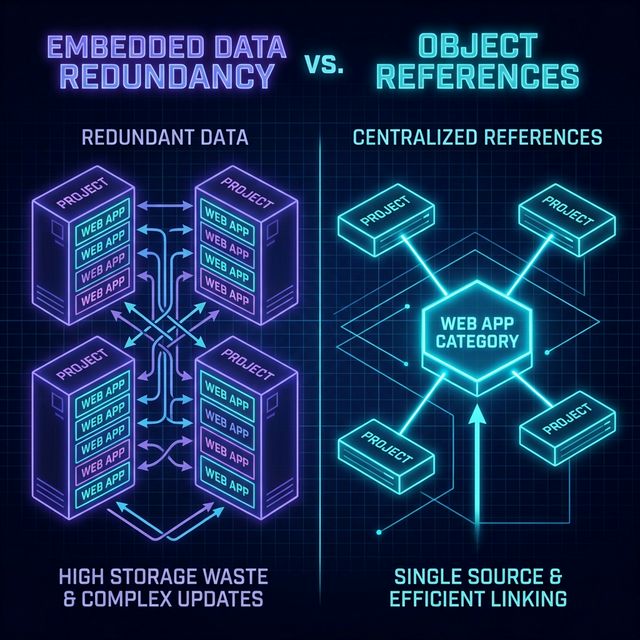
Fig 1: Data Redundancy vs Object References
If this were SQL, this is equivalent to rewriting the same string into every row of a table instead of using a foreign key.
Flaw 2: The Global Update Problem
Section titled “Flaw 2: The Global Update Problem”Imagine you decide “Web App” isn’t a professional enough title. You want to rename the category to “Full-Stack Web Development”.
With embedded data, you must:
- Search your entire database for any Project containing the string “Web App”.
- Run a massive, heavy multi-document update command to loop over all 50 projects to rewrite that embedded string.
- Hope that no other project accidentally used a typo like “Web Apps”, because that single typo will be entirely skipped by your search criteria, leaving orphaned data permanently stranded.
Flaw 3: Standalone Access
Section titled “Flaw 3: Standalone Access”If you want to build a public “Browse by Category” directory page that lists all available categories… how do you fetch a list of categories?
If they are embedded inside projects, you must pull down every single project in your database, parse through all their embedded data, strip out the duplicates, and map an array of unique strings manually in memory. That is a performance nightmare.
The Power of Object Reference
Section titled “The Power of Object Reference”This is why we use Object References.
Instead of embedding the category name inside 50 projects, we create a completely independent Category collection. We insert one document named “Web App”. MongoDB generates a unique ObjectId for that document: 64a51d9e2b8f...
Now, when our 50 projects need a category, they don’t store the string. They just store the ObjectId:
// A Project Document Using Reference{ title: "My React Portfolio", categoryId: "64a51d9e2b8f...", // Points identically to the Category Collection tags: [{ name: "node" }]}By treating Categories as referenced data, renaming “Web App” to “Full-Stack Development” requires updating exactly one document. All 50 associated projects instantly inherit the new context automatically because they only store the dynamic pointer.
Extra Bits & Bytes
Section titled “Extra Bits & Bytes”MongoDB Object References
📘 Referencing Documents Infographic (PNG)
⏭ Next: Project Categories by Object Reference
Section titled “⏭ Next: Project Categories by Object Reference”Let’s begin setting up our Project Categories using this highly scalable referenced approach.