Uploads Game Plan
The Blueprint
Section titled “The Blueprint”File uploads in Node.js change the nature of how form data is submitted and processed over standard text parsing. Instead of just sending form URL encoded text, we are moving binary blobs of data alongside text inputs.
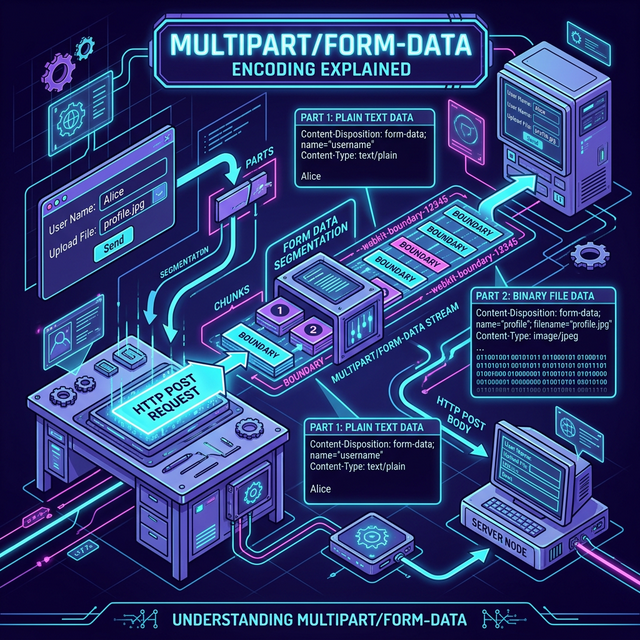
Fig 1: Multipart Form Data Encoding Explained
To handle a robust 1-to-many relationship (one project, many configurable projectImages), our goal is to build a decoupled file processing handler:
1. The File Processor
Section titled “1. The File Processor”Instead of uploading a file while saving all other text inputs, we’ll handle file uploads as an independent operation on a dedicated “Manage Images” page associated with each project.
- We’ll separate the file upload process from the main project form to a specialized image upload form.
- We’ll select the physical file and submit it as a standalone form (to avoid the complexity of handling both file and text data in the same request).
- The backend will stream the file to disk storage, organizing it into a project-specific folder like
/public/uploads/my-cool-project. - The backend will reply with a redirect back to the same page with a success message and the image now displayed in the gallery.
- Later on, when we want to modify metadata (like accessibility tags) or delete an image, we’ll use asynchronous
fetchrequests without needing to re-upload the file!
2. The Relationship Mapping
Section titled “2. The Relationship Mapping”With the image stored safely on the disk, our Project object needs the metadata mapped. Our administrative interface will support:
- Alt Tags: T.A. Watts insists on full accessibility markers.
- Captions: Optional text to display below the image.
- 1-N Images per project: Permitting multiple objects within the
projectImagessubdoc array. - An isFeatured Flag: Enabling users to mark exactly one of the subdocuments as the thumbnail cover image for the project list page.
- The original filename: We’ll store the original filename so we can reference it later.
- A unique filename: We’ll store a unique filename so we never run into filename collisions.
We could also store fields for sorting gallery images, but the above list is sufficient for our purposes.
REMEMBER: We must change our encoding to multipart/form-data in the
form, otherwise the data stream collapses.
⏭ Next: Project Images As Embeds
Section titled “⏭ Next: Project Images As Embeds”Let’s look closely at how we will structure the Mongoose Schema to properly embed our new file metadata.